Every change, what it was like before, and the issue behind it. Nearly all of
these started as a bug report or a feature request from someone using ZenNotes.
Your saved tabs come back the moment the window opens instead of waiting out the vault scan, and you can jump straight to a tab: {count}gt in vim, Alt+1 through 9 everywhere else.
Features
Jump straight to a tab: {count}gt and Alt+1 through 9
gt and gT could only cycle, so reaching a specific tab meant hammering the same key past every stop. The vim half now follows vim's own contract: 2gt goes to tab 2, a count past the end lands on the last tab, plain gt still cycles, and {count}gT stays relative. The non-vim half is nine rebindable shortcuts, Alt+1 through Alt+9 (Ctrl+1 through Ctrl+9 on macOS, where Option types characters on many layouts and the Cmd digits are already taken). Tab numbers count across panes in the same order gt cycles, so cycling and direct jumps always agree about which tab is number 3. The shortcuts also know when to stand down: they yield while a modal, palette, or menu is open, they lose on purpose to any combination you had already rebound to another action, Alt plus numpad digits stay reserved for Windows Alt-code character entry, and digit bindings match the physical digit row so Alt+1 works on layouts like French AZERTY where the digit keys type punctuation. One macOS note: with multiple Spaces, Mission Control claims Ctrl+digit before the app sees it; rebind under Settings, Keymaps, or free the key in System Settings.
Three tabs open; 2gt activates the second, plain gt cycles to the third, then Ctrl+1 and Ctrl+3 jump directly.
Fixes
Saved tabs paint before the vault scan finishes
Opening a big vault left the tab strip and editor blank for seconds while the app walked every note on disk, because startup awaited the full index before restoring the saved workspace. The order is reversed now: the workspace snapshot (a few hundred bytes) is restored and painted immediately, and the scan lands behind it. Everything the snapshot could get wrong has a corrector: the active tab is read straight from disk and dropped if its note is gone, background tabs whose notes vanished are pruned the moment the real listing arrives, and once that first listing lands every restored tab is checked against it, so a stale snapshot synced from another machine cannot leave a ghost tab with a blank editor alive for the session. The bigger the vault, the bigger the win.
Two launches of the same 20,000-note vault side by side: 2.26 sits on the home screen until the scan ends, 2.27 shows all three tabs and the open note immediately.
Template variables stop doubling their closing braces
With auto-pair brackets on, accepting a variable from the template editor's {{ popup produced four closers: typing {{ auto-pairs to {{}} with the caret in the middle, and the completion then pasted a full {{cursor}} without consuming the closers already sitting there. Accepting a variable now swallows up to the two braces its insert replaces, and only when they can belong to the variable's own opening pair: prose documenting Handlebars or Jinja syntax keeps its literal braces. Editing an existing variable in place is fixed by the same change.
Accepting {{cursor}} from the completion popup: before, the text grows a second pair of closers; after, it lands clean.
Vim's pending f motion owns the next key over the m menu
In visual mode, f m opened the editor context menu instead of extending the selection to the next m, and the orphaned motion then swallowed the first key typed after the menu closed. The m shortcut lives in a window-level listener that runs before the editor ever sees the event, so vim never got the chance to consume the key as an operand. The shortcut now yields whenever vim has a sequence in flight: f, t, and r keep their target character, counts and registers keep their prefixes, and a plain m on a selection still opens the menu.
v f m: before, the context menu pops over the text; after, the selection extends through the m, d deletes it, and plain v m still opens the menu.
:wa saves everything instead of closing everything
The :wa and :wall ex commands were registered as aliases of :qall, on the theory that autosave leaves nothing to write. But :wa is a save command, not a quit: typing it reflexively after an edit demolished the whole tab layout. It now writes every unsaved note across all panes and closes nothing. The quit-and-write family keeps closing, exactly as vim defines it, and :wqa / :wqall is newly registered so the common spelling of save-everything-and-quit works too.
Three tabs, one edited: before, :wa closes them all; after, :wa keeps every tab and writes the edit, then :wqa closes everything deliberately.
Image size hints actually resize the image
![[assets/pic.jpg|100x50]] and the markdown spelling  rendered full-width with the hint leaking into the alt text, even though the help promised size hints for images. Both spellings now work in Edit, Preview, and PDF export: |300 sets width with height following the aspect ratio, |600x400 sets both, and captions keep their text. The edges hold too: a zero dimension is not a resize, a purely numeric alt in the markdown spelling stays your caption ( is a year, not a 2024px width; write  to size it), and an image that scrolls away and back does not resurrect a hint you edited out.
Before: both spellings render full-width, with the size hint leaking into the alt text.After: the same note shows two tidy 100x50 thumbnails with clean captions.
Two bugs where ZenNotes was quietly throwing your text away: table cells that swallowed a bare + or -, and Typst preambles that filled your tag list with variable names.
Fixes
Typst preambles stop dirtying your tag list
A Typst preamble is Typst source, not prose: #let vec(x) = bold(x) defines a variable and formulas call it back as #vec, and every tag scanner read those as hashtags, so vaults using tag-driven preambles grew a tag list full of let and variable names. Notes in the preamble folder are now left out of the tag index everywhere: the app, the zn CLI, MCP, and the self-hosted server. Tags are the only thing skipped, so a preamble keeps its excerpt, its wikilinks and its searchability. The preamble folder is configurable now, under Settings, Editor, because skipping it is not free: if you already keep ordinary tagged notes in a folder called typst, point the preambles elsewhere and those notes get their tags back. The name lives in the vault, so every runtime agrees. Upgrading corrects an existing vault on the first scan rather than waiting for each file to change.
A Typst preamble sits in the vault while the tag list stays clean, then renaming the preamble folder in Settings hands that folder its tags back.
Plus and minus stay visible in table cells
A table cell holding just a + or a - rendered blank in Edit mode while Preview showed it perfectly, so a table of signs looked like an empty grid. The live-preview table widget ran each cell through the block markdown parser, which read a lone - or + as a bullet-list marker and produced an empty list item: the character was parsed away, not mis-styled. A GFM cell holds inline content and never blocks, so a cell is now parsed as a cell, through the same parser as the reading view. The same cause blanked # and 1., turned --- into a rule inside the cell, and ate the marker in "- x"; all fixed together, with bold, code, links, wikilinks, tags and math in cells untouched.
Databases meet your notes: [[ completion in cells, live note-sourced select options, Note link columns, a database-speaking CLI, and nested lists you can actually read.
Features
Databases discover your notes
Type [[ in any text cell and the editor's note search opens right there, inserting a wikilink. A Select or Multi-select column can source its options from the vault: point it at a folder or a #tag from the column menu and the cell popover suggests matching notes live, with anything you pick saved as an ordinary option so boards and filters keep working. And the new Note link / Note links column types store real wikilinks: chips show each note's title and open it on click, and titles with commas survive. Every picker is keyboard-first: type to search, arrows or Ctrl+N/P, Enter picks.
A meetings database fills its Project and People columns straight from the vault, links a note, and opens it from the chip.
The zn CLI speaks database
Agents and scripts get the same powers: zn base list, create, rows, get, add, and set. Pipe a meeting transcript into zn base add and it becomes a row WITH its record page, frontmatter mirrored and the transcript as the body; zn base set edits fields with the grid's exact semantics, minting select options and re-mirroring the page. Everything works on a local vault or, with --server, against your self-hosted ZenNotes, and the open app shows CLI-made rows live through the watcher.
An agent shell pipes a transcript into zn base add; the row and its record page appear live in the open app.
Nested lists you can actually read
Every nested list level now renders a full tab size deep, whatever the note's source spacing, so two-space-indented notes stop blurring together on large monitors. Vertical indent guides mark each level, on by default with a toggle under Settings, Editor. The Tab size slider (1 through 8) governs the step width, and the raw markup never changes.
A two-space nested list steps a full tab size per level with guides; the slider widens it to 8 live.
Fixes
Reference pane frontmatter, fixed
Pinning a note as a reference now renders its YAML frontmatter as the same styled properties card as the main editor, instead of raw fences with the properties blown up into a heading. Also fixed underneath: a YAML quoting gap that could corrupt a record page when a cell value started with brackets or a list marker, and the database filter menu no longer throws on column types from a newer version.
Remote vaults you can trust: live sync everywhere, full asset actions, and a default view mode for the readers.
Features
Full asset operations on remote vaults
Every asset action now round-trips through your self-hosted server: delete parks the file in the vault's own Trash with an undo token, restore puts it back, and duplicate, rename, move, drag-drop import, and clipboard paste all work exactly like a local vault. The Trash store lives in the vault itself, so a vault served remotely today and opened locally tomorrow shows the same history. Opening a non-previewable attachment (a ZIP, say) downloads it from the server first instead of failing on a path that only exists there.
reported by Kta on Discord
A note edited on the server appears live; the server restarts and the app resyncs itself; an asset moves to Trash on a remote vault.
A default view mode, and Preview picks up where you were editing
Settings, Editor, Default view mode chooses what a note opens in before you have picked a mode for it: Edit to write, Preview to read, Split for both. Each note still remembers the mode you last used on it, and the choice travels with your portable config.toml. Switching from Edit into Preview now opens the reading view at the line your cursor was on instead of the top of the note, so switching to Preview to read what you just wrote lands exactly there.
Pick Preview as the default; a fresh note opens straight into reading; after vim G, Preview lands on the chapter you were editing.
Fixes
Remote vaults sync live again, and stay synced
A server-side bug silenced every sync feed 25 seconds after it connected, on every release that had the feature, which is why changes from other devices only appeared after a manual refresh. The desktop's watch socket also reconnects with backoff now and resyncs everything it missed after any gap, without ever touching a buffer that holds unsaved edits.
reported by Kta on Discord
Callout titles keep their links, math, and color in the reading view
A callout title with a link or an inline formula in it fell apart in Preview: the text before the link stayed in the colored title while everything after dropped into an uncolored paragraph a full gap below. The title is now everything on the first line, inline markup included, and multiline callouts lost their phantom empty line. PDF export prints the preview, so it picks the fix up too.
Sidebar polish: auto-reveal, the m key, and Favorites icons
Auto-reveal now expands the tree in Vault Root mode vaults and for database tabs; pressing m on a highlighted folder opens its context menu even when a database grid held the keyboard; and notes pinned to Favorites finally show their custom icons and colors instead of the generic document glyph.
Not every checkbox is a task: reading lists stay checklists, projects stay one card, and whole folders can opt out of Tasks.
Features
Separate checklists from tasks
Add tasks: false to a note's frontmatter and its checkboxes stay checkboxes: they render and toggle as always, but stop feeding the Tasks list, the boards, the calendars, the CLI, and MCP. On a #task note, tasks: note keeps the project's own card on the board while silencing its internal checklist, so a project is one card instead of twenty. Whole folders can opt out from the sidebar ("Exclude from Tasks") or Settings, and because a database is a folder on disk, that covers databases too. The setting lives in the vault itself, so desktop, web, the self-hosted server, and the CLI all agree; zn task list --include-excluded lists everything when you want to see past your own exclusions.
A reading list floods Today; tasks: false, a folder exclude, and tasks: note leave only real work.
Fixes
Display math inside a table cell renders in the reading view
$$...$$ in a table cell rendered in the editor but showed raw source in Preview and Split: the guard that keeps "I paid $5" from becoming a formula was demoting genuine double-dollar math. Cell math now renders in display mode under KaTeX and Typst alike, and currency in prose or cells stays plain text.
Before: the editor renders the fraction while the reading view shows raw source. After: both sides agree.
The Linux AppImage mounts fast instead of compressing small
A 45-second boot on Arch turned out to be squashfuse decompressing xz blocks on every scattered startup read: the same image extracted to disk started in 0.63 seconds. The AppImage (and the deb, rpm, and pacman packages) now ship gzip squashfs: a bigger download that starts an order of magnitude faster on FUSE mounts.
#547diagnosed nearly end to end by @bert-maes's exemplary report
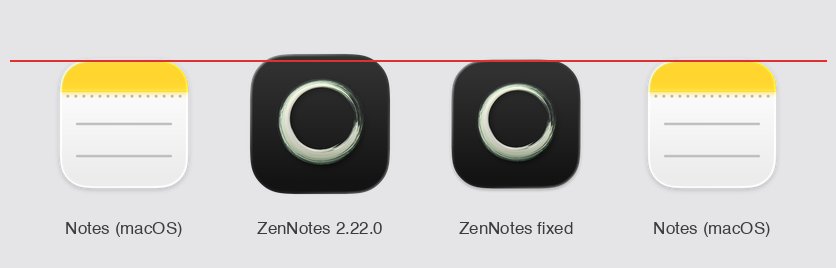
The macOS Dock icon sits on Apple's icon grid instead of looming over its neighbors.
Fixes
The macOS Dock icon falls in line
ZenNotes rendered about 9% larger than every other icon in the Dock: the tile was drawn 896px wide on the 1024px canvas where Apple's grid draws 824. It was two bugs hiding as one, since the installed app was also overriding its bundle icon at runtime with the oversized image, a leftover from a dev-mode workaround. The icon is redrawn on the exact grid with the soft shadow system icons carry, and the override now stays in dev.
The Kanban board remembers your order, archived notes retire their tasks, and Cmd+L turns any line into a checkbox.
Features
Cmd+L turns any line into a checkbox
The Obsidian habit, asked for on Discord in exactly its terms: turning a note into a task, and soon later marking it done. Press it on plain text and the line becomes a task; press again and it checks, again and it unchecks. Bullets and numbered items keep their markers, blockquotes and indentation survive, and a multi-line selection converts in one undo step. Forwarded and cancelled tasks are deliberately left alone, since both are records with their own commands. Remappable as editor.toggleCheckbox.
asked for on Discord
Three plain lines become tasks with one Cmd+L each, and another press checks the first one off.
Archiving a note retires its tasks
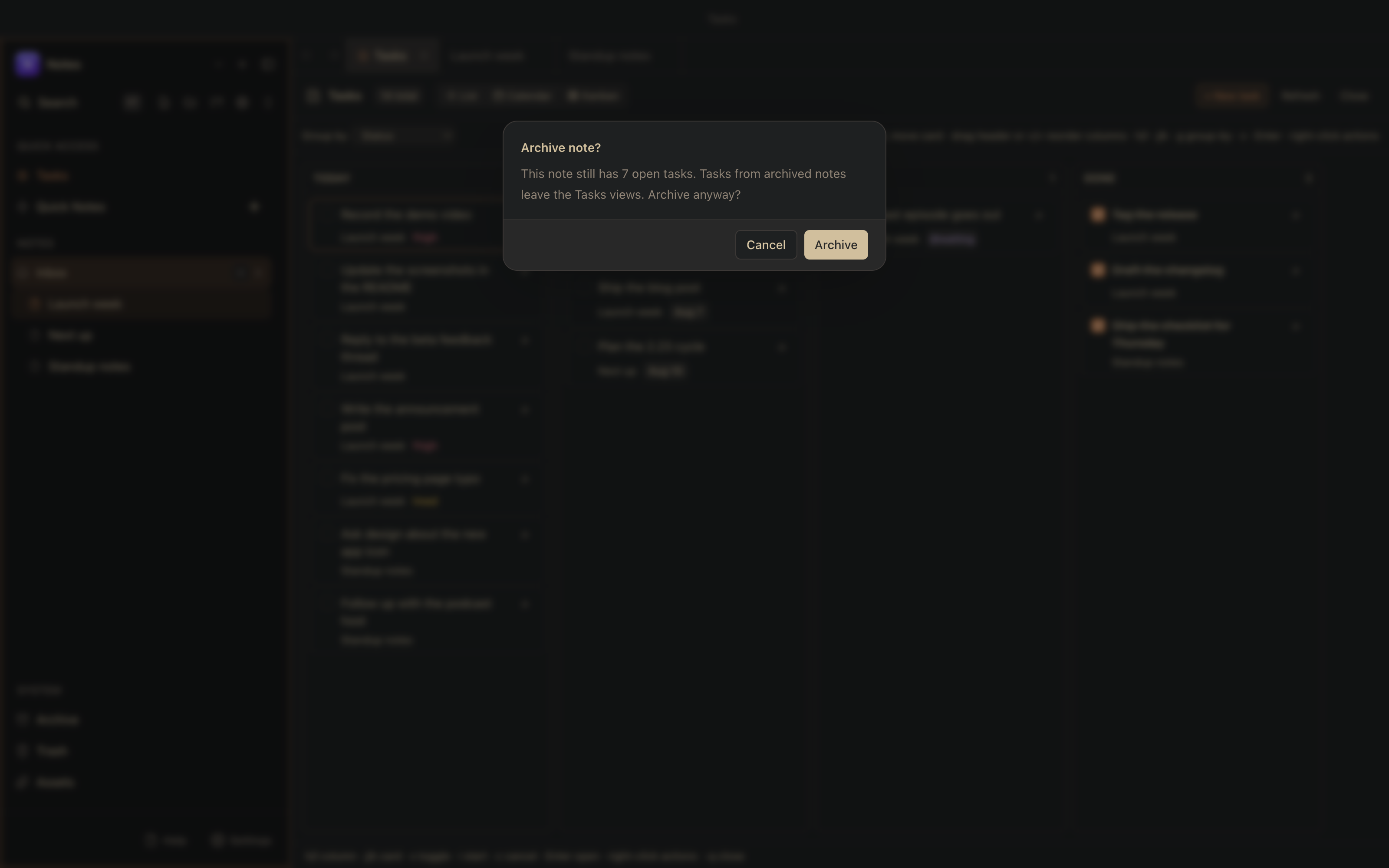
Finish a project, archive its notes, and every completed task they held used to stand in the Done group and the Kanban Done column forever. Now a note that moves to the Archive takes its tasks with it, off the list, the boards, and the calendars. Nothing is written to your files, and un-archiving brings everything straight back. Archiving a note that still has open tasks asks first, on every path in, and a bulk archive asks once for the whole set. A toggle under Settings, Tasks restores the old behavior.
Archiving a note that still has open tasks asks first, on every path in.
Fixes
The Kanban board keeps the order you drag cards into
Prioritize the Today column by hand, open a note, come back, and the column used to be sorted by due date again as if nothing had happened. Card order is now a real preference, saved like the column arrangement already was: it survives switching views and restarting the app, every board keeps its own order per column, and it degrades on purpose, so a note rewritten by another editor just falls back to the due-date sort instead of landing somewhere wrong.
reported by a user
Dragging a card up the Today column, opening a note, and coming back: the hand-set order holds, and it survives a restart too.
A narrow sidebar keeps Files, Help, and Settings readable
Shrink the sidebar far enough and the file counter painted over the word Help while Settings pushed through the panel border. The footer now gives way in steps as the sidebar narrows: first the file count folds into the Files tooltip, then the labels drop and the three actions stand as icons, with tooltips and screen-reader labels carrying the names. The search row wraps its icon strip onto its own line instead of overflowing.
At the sidebar's minimum width the footer stands as icons instead of painting labels over each other.
Notes created on a remote vault carry their title
Open Today's Daily Note against a self-hosted server and the note arrived blank, no date heading, while the same command on a local vault seeds one. The server's copy of the create operation wrote an empty file where the desktop writes the title heading; they now agree byte for byte, which also fixes plain new notes from the web client and the CLI pointed at a server. Server-side, so self-hosters get it by updating the server or the Docker image.
A task can say it is in progress, a parent shows how far its subtasks are, and Mermaid draws while you write.
Features
A task can say it is in progress
- [/] joins open, done, forwarded and cancelled as a task state, following the Obsidian Tasks convention. Type it, run “Mark Task In Progress” from the palette, or press i on a task in the Tasks list, on the Kanban board, or on the calendar; it draws as a half-filled box in the editor and the reading view. The point is what separates it from forwarded and cancelled: in progress is still open work, so it keeps its place in Today, stays on the calendar and the board, and rolls forward with your unfinished tasks when a daily note rolls over. It is plain markdown everywhere: the editor, the zn CLI, the MCP server and the self-hosted Go server all read it, so a state one surface understands is never dropped by another.
Marking a task in progress from the palette, the half-filled box in the editor and the reading view, and the task holding its place in Today.
A parent task shows how far its subtasks are
A task with checkboxes nested under it carries a chip at the end of its line, 2/5, neutral while work remains and green once every child is done, in the editor and the reading view (which also covers exported HTML and PDF and shared notes). The number is derived every time the note renders and is never written into the file, deliberately: ZenNotes is not the only writer of a vault, and a written marker goes stale the moment Obsidian, vim, or your phone checks a child off. Direct children only; cancelled and forwarded children leave the count entirely, and an in-progress child counts toward the total but not toward done.
#512asked for by @NunonuN, including the display-only design call
Checking children off and watching the parent's chip follow, then the chip turning green when the last one is done.
Right-click a task, anywhere you can see one
The Tasks list, the Kanban board, the Tasks calendar and the calendar side panel now share one menu: open the note, the four state changes, @waiting, forward to another note, due presets, priority, and delete. Each entry shows the key that does the same thing, so the menu doubles as a way to learn the shortcuts, and typing filters it. Before this, the calendar had a menu and the list and the board had none.
The same right-click menu on the Tasks list and the Kanban board, with the matching key beside each action.
Mermaid diagrams draw while you write
A mermaid fence in the editor now shows the diagram itself, not only in preview. Put the cursor anywhere in the block and the code comes back for editing; move away and it redraws. A diagram you are halfway through typing keeps its last good picture rather than flashing an error at every keystroke. Arrow keys and Vim's j/k step into a drawn diagram the same way they step into rendered math, so the source is always reachable without the mouse. Mermaid only for now: the other diagram languages either run a whole typesetting engine or are interactive, and they need their own answer.
Headings fold and label themselves, and text expands as you type
Settings can show H1 through H6 labels before headings, and every heading folds from its arrow, from Ctrl+Alt+F / Ctrl+Alt+U (Cmd+Option on macOS), or from zc / zo in Vim mode. A new Text replacements settings tab expands typed triggers, starting with -> to →, and takes custom symbols, words, and phrases. Tab width is configurable from 1 through 8 spaces, Ctrl+Tab switches to the most recently used note and alternates between the last two, the cursor survives a round trip through Preview, and unstarred equation environments number themselves in document order, consistently in the editor and Preview.
H1 and H2 labels in the margin, a section folding from the keyboard and from the arrow, and unfolding again.-> becoming a real arrow mid-sentence, and a second custom rule expanding as it is typed.
Select several steps on the Workflows canvas and move them together
Hold Shift (or ⌘ on macOS, Ctrl elsewhere) and click to add a step to the selection, or hold Shift and drag a box across the canvas. Mod+A takes the whole workflow. Dragging any member moves the group, and Esc clears it. The options panel edits one step at a time, so it steps aside while a group is selected. Bulk delete is deliberately left out for now: removing several steps at once has to renumber the rest of the file as it goes, and that deserves its own change.
If you installed ZenNotes and ran zn, it printed a module error and quit, on every platform and every install method, since 2.20.0. The CLI ships beside the app in a folder with no library directory, and one dependency was left to be resolved at startup; a development checkout quietly answers that lookup from the workspace above, which is why three releases shipped a CLI nobody could run. It is now compiled in with the rest, and a build-time check runs the built CLI somewhere with nothing around it, so the build fails if this ever regresses.
In a soft-wrapped paragraph, $ and A jumped to the end of the whole paragraph and I jumped back to its beginning; they now stop at the edges of the current display row, where the cursor appears to be. A count still means logical lines, so 3j follows the relative line-number gutter. :13 jumps straight to line 13 again, and pressing H or L again at a viewport edge keeps scrolling instead of dying. Shared by the main editor, Quick Capture and floating note windows.
With Kanata-style tap-hold mods, a label letter held a beat too long reaches the OS as a bare Shift or Control, and hint mode read that as a request to leave; if the misfired Shift was still down when the letter arrived, the uppercase letter failed the lowercase-only test and closed it too. Bare modifier presses are now swallowed while the labels wait, and letters match case-insensitively, so the worst case is pressing the letter again with the labels still up.
#526reported by @RonnyOtieno20, whose Kanata config answered what five reproduction attempts could not
Hint labels staying up through bare Shift and Control taps, then a label typed with Shift held still opening its target.
A card flicked onto Today lands due today, not tomorrow
The Kanban drop applied to the column under the last pointermove the renderer processed, never to where the pointer was released; pointermoves coalesce under load while pointerup arrives immediately, so a fast flick from Waiting into Today released over Today while the trailing state still said Upcoming, whose semantics for a dateless task are “set due tomorrow”. The drop now belongs to the column under the release point, with the last hovered column as the fallback when the release lands in a gap.
Before: a fast flick into Today lands the card in Upcoming with tomorrow's date written into the note.After: the same flick lands in Today, due today.
Non-standard task states draw everywhere, and clicking checks the right line
A cancelled - [-] or forwarded - [>] task rendered as literal brackets in the reading view, in HTML and PDF export, and in shared notes, while the editor drew proper markers for the same lines; all three states draw everywhere now. Clicking a checkbox in a note whose first task was cancelled or forwarded wrote to a different line, one row off per stateful task above it; the reading view now counts every task line the way the file does. Editing a forwarded task on the calendar no longer strips its due:, priority, tags and backlink, the list and the board no longer draw every state as the same empty checkbox, and the Tasks view stopped advertising keys that cannot fire in the current mode.
Links to notes inside a database work on a self-hosted server
A wikilink pointing at a note inside a database resolved fine on a local vault and came back unresolved against your own server; clicking through would have created a duplicate note. The server was walking past database folders when listing notes: right for the spreadsheet parts, wrong for the pages inside, which are notes you open, write in and link to. Tasks written inside database pages and the database's children in the remote sidebar had the same hole, and all three close with the one change.
Finishing the Workflows tutorial removes the practice folder
The tutorial promises your vault ends exactly as it started, but on a vault that keeps notes at the top level, or one whose system folders point at directories you named, the practice folder stayed behind. It referred to that folder two ways, a fixed path and “the Inbox plus this subfolder”, which are the same directory until your Inbox is not where the fixed path assumed. Everything the tutorial creates is now placed by asking the vault where the folder actually is, so cleanup reaches all of it.
Tags in any script can be typed on the Workflows canvas
Typing a Cyrillic tag into a step's tag field left only the hyphens behind: the per-keystroke check knew the English alphabet and nothing else, so every other letter was deleted as it was typed. Greek, Japanese, and a plain café went the same way. The rule for what a tag may contain now lives in one place shared with the file format, so the canvas cannot disagree with it again.
The CLI install screen reads the PATH you actually have
Settings warned that ~/.local/bin was not on your PATH while your terminal disagreed, because an app opened from the Dock never sees the PATH your shell builds. ZenNotes now asks your login shell, the same way it already finds tools installed by Homebrew or cargo, and falls back to what it knew before if the shell cannot be reached. The warning still appears when the directory really is missing.
Settings ▸ Vault ▸ Folders silently blanked the box on a path it could not accept, and a hand-edited vault.json line was ignored without a word. A refusal now explains itself, naming the actual problem, and the same sentence goes to the log when a config line is dropped. Nested paths remain unsupported on purpose: a system folder is one folder name at the top level, because everything in the app classifies a note by the first part of its path.
A flowchart node reading “User types a sentence” could render as “User types a sent”: mermaid measured labels in one font and painted them in another, because the label font was inherit and the two places that word resolves are not the same place. ZenNotes now passes the resolved font stack, so the font that measures is the font that paints, including a text font you chose yourself, and it waits for fonts to load before rendering.
The app looked for its icon in a folder that only exists in the source tree, so every installed launch logged a failure and fell back. Cosmetic, and wrong since 1.1.0. Found by launching the packaged app and reading its log rather than the checkout's.
Databases work again on a self-hosted server, whatever version it is running.
Fixes
Databases on a remote vault work again, whatever version your server is
Creating or opening a database against your own ZenNotes server could fail with a 500 error naming data.csv, and nothing about it was your fault or your vault's. A database is not something the server knows about: it is a folder holding data.csv and schema.json, built out of ordinary file reads. That makes one question load-bearing, "is this file missing, or did the request fail?", and the two answers point opposite ways. A missing schema.json means "this is a plain CSV, adopt it", so reading a failure as missing would write an inferred schema over your real one; a missing data.csv is how a new database finds a free name, so reading missing as a failure makes creating one impossible. 2.20.0 trusted only a clear "not found", which protects your schema but broke against servers older than 2.20, which answer every missing file with a server error. Now the app asks: on the first server error it requests a path that cannot exist and reads the answer, so a server that can say "not found" keeps having its errors treated as errors, and one that cannot stops being taken literally. Servers from this release also state it outright, and reading a folder as a file now says so instead of returning a generic error.
2.20.0 could not start. This fixes it, and nothing else.
Fixes
2.20.0 would not launch
Every platform, straight to "A JavaScript error occurred in the main process" with no window behind it. 2.20.0's new Word export made the main process the first part of the app to parse markdown, and it loaded that parser from the packaged app's own files at startup; the packaging step laid one of them out where the module loader cannot look, so the very first import failed before the app drew anything. The main process now carries its markdown parser inside its own bundle rather than looking it up at startup, so there is no longer a file layout for packaging to get wrong. Nothing was wrong with your vault, and everything from 2.20.0 (Workflows, custom code languages, folder remapping, the new exports) is in this release unchanged.
reported within the hour by a Windows 11 user whose screenshot carried the full stack trace
Workflows: the rituals you repeat over your vault, written down once and run with one key. Plus bring-your-own code languages, and folders that can be the system folders.
Features
Workflows: repeatable pipelines over your notes, drawn as a graph you can read
Anyone who keeps a vault long enough ends up with a ritual: find the notes tagged #book, keep the good ones, sort them, paste a table into the reading log, tag the rest for later. Workflows turn that ritual into a file. A workflow is a plain .md under .zennotes/workflows/, a few lines of frontmatter and a pipeline per line. Naming a wire is the whole grammar, and reading the same wire from two lines is a branch with no extra syntax. The canvas renders that text as a graph and the text renders back from the canvas, losslessly both ways, because the layout is computed rather than stored: no coordinates in your file, and clean diffs in a git-backed vault.
The part that makes it trustworthy is that the engine can only plan, never write. Every wire shows the live count of notes flowing through it, and Run shows you every change grouped and counted before anything happens. Apply, and each file's pre-run bytes reach the disk before the write they cover, so Undo restores every file byte for byte, a run that fails midway rolls itself back, and a run the app never finished is found on the next launch and offered back to you rather than left as a silence.
Workflows are off by default, deliberately: they can rewrite notes in bulk, so the view, its sidebar row, its command and its Space a binding all appear together when you flip the one toggle. Desktop only this release.
books   = tag #book
good    = books | where rating >= 4 | sort finished desc
someday = books | where rating < 4

good    | render table title, rating, finished | write-section "Reading Log.md" "Finished"
someday | add-tag #someday
The canvas with live wire counts, the recipe gallery, the dry-run confirmation naming 3 changes across 3 notes, Apply, whole-run Undo taking it back, then a second run and the sorted table the workflow wrote. Driven over CDP against a real build on an isolated vault; nothing is mocked.Authoring one from scratch: the preset gallery grouped by Review, Cleanup, Capture and Reporting, autocomplete offering every verb that can follow a pipe with its parameter signature, tag and path completions from the vault you actually have open, and the unsaved-text guard on the way out.The unhappy path. A step naming a template that does not exist is marked red with its line number, and Run refuses up front, with "Nothing has been written to your vault" still true in the footer.
Run a workflow from the command palette, from anywhere
Running a pipeline should not require visiting the view that edits it. Every active workflow is now a palette command, and Run Workflow… opens a browsable picker with your workflows and their descriptions, a writes tag on the ones that change notes, filter and Enter. Both paths walk the same ladder as the view's Run button: a fresh plan from what is on disk, the unsaved-edits question if the run would write a note you are mid-edit in, the dry-run confirmation, then apply. The receipt arrives as a toast carrying the Undo button with it, because you never left whatever you were doing.
The same run driven entirely from the command palette. Run Workflow… opens the picker, Enter, the same confirmation, and the receipt toast carrying the Undo button, which gets clicked. The Workflows view is never opened.
Bring your own language: import a TextMate grammar and your fenced code blocks highlight
ZenNotes ships highlighting for the usual suspects, and until now anything outside that list rendered as flat grey text. If you write in a niche language, or you are the person who invented it, that was the end of the road. Now it is a file you drop in: grab that language's .tmLanguage.json, the same format VS Code extensions use, then Settings, Editor, Languages, Add language. From that point your fence tag highlights while you type, in split, and in the reading view, in your current theme's colours.
The guardrails are the interesting part, because a grammar is someone else's file. Built-in language and diagram tags are reserved, so nothing can quietly take over python or mermaid. Grammars needing external scopes are rejected up front. And a grammar that cannot keep up is refused rather than tolerated: before an import counts as installed it is run off the UI thread against a corpus of the repetitive lines that make backtracking patterns explode, with a hard timeout. Costs nothing at all if you never install one, since none of the engine loads until you do.
Until now the four system folders were hardcoded directory names, so pointing ZenNotes at an existing vault meant reorganizing it: an Obsidian vault with "01 - Entry" for capture had to rename it inbox/ or lose the Inbox view. Settings, Vault, Folder Paths now maps Inbox, Quick Notes, Archive and Trash to a directory of your choosing, stored per-vault in vault.json so the mapping travels with the vault to every device and to a self-hosted server. Classification follows everywhere: sidebar counts, task scanning, search, the web app, the MCP server, and workflows all treat the remapped directory as the system folder it stands for.
Notes grew real exits: Word export, copy-for-email HTML, and every export states its title
Sharing a note outside your vault used to mean choosing between three degraded copies of it. Export Note as Word Document… now writes a .docx built from Word's own vocabulary rather than a frozen picture of the app: headings map to Word's real Heading styles, links use the Hyperlink style, lists are actual Word numbering, tables are tables, task lists keep their glyphs, and vault images are embedded. Because the structure is Word's own, the person you send it to restyles the whole document by editing Heading 2 once. Copy Note as HTML puts a fully inline-styled rendering on the clipboard, which is the only styling mail clients reliably keep. And the PDF export finally states the title instead of starting mid-thought.
reported by Jan
A note whose title lives in frontmatter: Copy Note as HTML runs from the palette, the new Word export command appears, and the take ends on the export page itself, now opening with a stated H1 instead of starting mid-thought.
Renaming a note carries its title heading along
A new note starts as # <title> with an empty body, so heading and filename begin identical, and then the first rename separates them, leaving # Untitled above a note called something else. Now the heading follows the name, from the breadcrumb, the sidebar, the note list or the palette, whether or not the note is open. The rule is deliberately narrow, because rewriting text you did not ask to edit has to stay predictable: an existing top-level heading is retitled, and one is never invented. A note opening with prose, a list, or a ## heading is left byte-identical, which makes deleting the # line a permanent per-note opt-out.
Point an AI client at the ZenNotes MCP server and ask about your vault, and until now the answer was a list of bare paths. Now every note-shaped result carries a zennotes:// link, and the server's instructions teach models to render note titles as markdown links with it, unprompted. Ctrl+click one in your chat and ZenNotes comes to focus with that note open; it works with the app closed too, since the OS launches it. The parser refuses absolute paths and traversal, so a link can only ever name a note inside your vault.
zn open against a running app no longer piles ZenNotes icons into the Dock
The helper process that delivered the file lingered for a minute and a half before quitting, because on macOS Electron never promptly fires ready in a process that lost the single-instance race, and our quit was parked behind ready. Anyone feeding files in steadily stacked up Dock icons that looked exactly like ZenNotes multiplying. The loser now exits the instant the lock is denied, which is safe because its arguments are handed to the running app before the denial even returns.
A table-menu action can no longer vanish because you had just typed in a cell
Type into a table cell, then open the table menu and pick an action, and the action silently did nothing. Opening the menu moves focus out of the widget, leaving a just-edited cell commits it, that commit rebuilds the table widget, and the menu you are looking at still belongs to the old detached widget. The menu now records where its table lives when it opens and commits against the current document at that anchor instead.
#485reported by @uNyanda, whose recording cracked it
Typing [[ works again on German-family Mac keyboards
On a German, Austrian or Swiss Mac layout, [ is Option+5, and 2.19.0 quietly claimed that exact chord for the new hop-across-markers shortcut, so the keystroke that should have typed your second bracket moved the cursor instead. The hops now default to Ctrl+, and Ctrl+. on macOS, and both remain rebindable.
Connecting the desktop app to a ZenNotes server showed your databases and then refused to do anything with them. Every database operation was guarded local-only, with a comment claiming the server had no database endpoints; the premise was stale, since the web app had been composing full database support out of ordinary file reads and writes all along. That composition now lives in one shared module bound to each transport, and database failures are no longer silent anywhere.
Remote workspaces fail loud and recover, instead of failing strange
If the server was unreachable, anything that read a file over the connection treated the failure as "this file does not exist", so a dropped connection could silently close your database tab. Absence is now only ever concluded from an answer. And launching with the server down no longer dumps you on the first-boot welcome screen as if nothing had been set up: a configured-but-unreachable workspace gets its own screen that names the server and offers Try again.
Your pre-2.10 zen CLI heals into zn on launch
The CLI was renamed in 2.10.0 because zen collides with Zen Browser, but the rename only ever migrated inside an explicit Install click, so anyone who installed on 2.9.0 or earlier kept a working zen and no zn at all, while Settings told exactly those users the CLI was not installed. The app now migrates the managed symlink at launch. A foreign zen is never touched.
zn open <folder> stops failing silently
Four quiet failure paths could make it look absent, worst on Wayland: folders whose notes sat behind a bounded scan's blind spots, a CLI that claimed victory before its child had died, focusing an already-open folder doing visibly nothing because a Wayland client cannot raise itself, and a zn open racing startup queuing paths into a queue nothing drained. All four are fixed, and Open with ZenNotes from a Linux file manager works.
reported on Discord by Olivier
Walking a Kanban card quickly no longer loses it, in either sense
Move a task across the board with quick Shift+H presses and the second hop broke: the focus ring vanished, and, invisibly, the move itself reverted on disk. Two races compounded when the next press landed before the previous write settled. Clean notes now write straight to disk, and the optimistic overlay is retired only by its own guarded timer, so the ring rides the card through every hop and every hop lands in the file.
Visiting a daily note no longer switches the Calendar panel on everywhere
The panel is deliberately sticky, but the auto-open for periodic notes wrote into that same flag with nothing marking who opened it, so one daily-note visit turned into the panel being open on every note, quietly undoing a close you had made elsewhere. The open now carries its provenance.
Middle-clicking a tab closed no longer pastes into the note (Linux)
On Linux the middle button is two gestures at once: close this tab, and paste the PRIMARY selection. Under Wayland, Chromium can deliver the paste to the focused editor rather than the element under the pointer, so whatever you last selected landed in the note that took over after the close. The close now also cancels the mouseup and arms a short-lived guard that catches the paste event itself wherever it is delivered.
The app no longer loads 2.5 MB of diagram code every time it starts
Mermaid is meant to arrive only when a note actually contains a mermaid block, and in the source it is written that way. The bundler was undoing that: a rule grouping mermaid, cytoscape and dagre into one named chunk pulled the whole thing back onto the startup path. Dropping that rule cut the boot path from 4.89 MB to 2.25 MB with no change in total download size, and drawing a flowchart now pulls three small pieces instead of every diagram type you might have asked for.
Typst math that follows your tags, a CLI that reaches your self-hosted server, and one keyboard cycle across every panel.
Features
The zn CLI can talk to a self-hosted server
The desktop app and the web client could both work against a vault behind a ZenNotes server; the CLI was the odd one out, resolving every --vault to a path on the local disk. So scripting, automation and any headless box had to keep a local copy of the vault, even when the server was right there. Every command except zn open now works either way. A server you have already connected the desktop app to is nameable straight away, because the CLI reads the same saved profiles. For CI and headless machines, ZENNOTES_SERVER and ZENNOTES_REMOTE_TOKEN do the same without writing anything to disk.
zn list --server home
zn capture "from my laptop" --server home --tag work
zn list --server 192.168.1.10:7878 --token "$TOKEN"
The CLI on the left, the desktop app connected to the same server on the right, in one take. zn task toggle ticks the checkbox in the open note, zn append adds a line, and zn capture drops a new note into the sidebar — none of it typed into the app.What each failure says: a bad token, an unreachable host, a server name that isn't saved, and zn open against a server.
Typst math definitions that follow your tags
Different subjects want the same notation to mean different things — a vector is an arrow in physics and bold in maths — which normally means redefining it at the top of every note. Turn on Settings → Editor → Typst definitions from tags and a note's tags decide which definitions its formulas compile against. A preamble is an ordinary note in a folder named typst, titled with the tag path in dots: typst/physics.md serves #physics, typst/physics.mechanics.md serves #physics/mechanics, layering general → specific so the narrower tag wins. Because preambles are notes rather than hidden files, they sync, they're searchable, and editing one immediately re-renders every note that uses it.
The same formula in two notes: an arrow over the v under #physics, bold under #maths.#physics/mechanics inherits vector from its parent tag while adding its own force.
Step across formatting markers without the arrow keys
Mod+B drops the cursor between a fresh **|**, which is right for typing and wrong for everything after: finishing the word left you inside the markers. Alt+] now hops the cursor to the far side of the next run of markers on the line, and Alt+[ hops back over the previous one. It crosses everything the formatting shortcuts write plus the bracket pairs, which makes a link three quick steps: out of the text, into the URL, out of the link. Both hops are rebindable.
The same keystrokes twice: without the hop the typing continues inside the markers, with Alt+] it lands outside.
Keyboard navigation reaches every panel, by both routes
ZenNotes had two ways to move focus between panels and they disagreed about which panels existed. Ctrl+W h/j/k/l walked one set, the always-on Alt+H/J/K/L stopped dead at Connections, and the Outline panel was unreachable by either. Which route you had to use depended on which panel you wanted — precisely the thing a keyboard-first app should never ask. Both now resolve the same list, in the order the panels actually appear on screen: sidebar → note list → editor → connections → comments → outline → calendar.
All four side panels open: Alt+L walks the highlight across every one, then Alt+H walks it back.
The Outline panel is now keyboard-navigable
Focus it and j / k — or the arrows — move a cursor through the headings, gg and G jump to the first and last, Enter jumps the editor to the heading under the cursor, and Esc hands focus back. It picks up where you left it. While tracing the focus cycle, one more dead end turned up: focusing the Calendar panel silently bounced focus back to the editor. Panels now keep the focus that pane navigation hands them.
Alt+L focuses the Outline, j/k move the heading cursor, Enter jumps the editor to that heading.
Panels can be driven with Vim mode off
Reaching a panel is only half of navigating it, and until now the keys inside one came exclusively from the Vim layer — which isn't loaded when Vim mode is off. The keys that are universal everywhere else now work there too, in either mode: ↑ / ↓ move the row cursor, Home / End jump to the ends, Enter opens the row, and Esc hands focus back. The single-key motions stay Vim-only, exactly as in the sidebar.
The same panel with Vim mode off: j deliberately does nothing, then the arrows walk the headings and Enter jumps the editor.
An empty vault offers a first action instead of a hint
The home screen used to greet a brand-new vault with "No notes yet — create one to start writing." — a sentence telling you to do something, with nothing there to do it with. It now offers New note, New from template, and New database, each wired to the action it names. The template option matters most: templates are easy to miss entirely, and the moment you have nothing is the moment they are most useful.
Fixes
Column alignment says what it is, and no longer undoes itself
The table menu's alignment entries were a hidden toggle: choosing the alignment a column already had cleared it back to none. Since a column with no alignment renders exactly like a left-aligned one, a fresh column was baffling. The three entries are now a ticked group with a fourth, Align default. Separately, a table edit that landed while the parser hadn't caught up with a just-created table was silently discarded; it now falls back to reading the table block out of the document.
A fresh column shows Align default ✓, and choosing left shows Align left ✓ — the state is visible.
Ctrl+I italicises a Vim selection instead of jumping to another note
On Linux and Windows, where Mod is Ctrl, Vim's forward jump and the italic shortcut are the same chord — and the jumplist won it in every mode but insert. So selecting a phrase in visual mode and pressing Ctrl+I navigated away and discarded the selection. Visual mode now gives that chord to italic. Normal mode is unchanged, and so is Ctrl+O. macOS is untouched.
Vim visual mode over a word, then Ctrl+I: before it navigated away, after it wraps the selection.
Moving a Kanban card keeps it selected
Shift+H / Shift+L send the focused card to the next column, but the selection stayed behind. Worse: columns sort by priority and due date, so the card usually lands below what's already there, and when the moved card was the last in an auto-discovered column that column disappears — together putting the ring on an unrelated card, so the next press moved a task you never selected. The cursor now re-derives from the rebuilt board by column id and card identity.
The same two Shift+L presses: before, the ring is stranded and the wrong card moves; after, the moved card keeps the ring and walks two columns.
Tags in frontmatter show up in the sidebar
A vault written in Obsidian keeps its tags in frontmatter, and ZenNotes only ever scanned the body for #tags, so those notes landed under nothing. Frontmatter tags is now a first-class source everywhere tags are read: the sidebar, the main process index, the MCP server, and the self-hosted Go server. Inline arrays, block lists, quoted values and a leading # all parse. The frontmatter block is now excluded from the inline scan too, so a stray # in another field stops being counted.
The old build trails a stray ****; the new one ends clean.
Cancelled tasks stop haunting the calendar
A cancelled - [-] task rendered in the calendar day list with an empty checkbox, sitting next to real work as though it were still open — while the editor struck the same line through.
Columns collapse to automatic widths before, keep their 273/227px after.
macOS can reach a server on the local network
macOS 15 requires the Local Network privacy permission for any connection to a machine on your LAN. ZenNotes never declared it needed one, so the OS dropped the attempt before a packet left the machine — surfacing as a bare "fetch failed" that looked exactly like a server being down. The app now declares NSLocalNetworkUsageDescription so macOS prompts on first use, and the error text says where to turn it back on.
The server accepts its own desktop client's origins
ZENNOTES_ALLOWED_ORIGINS=* was ignored and a null origin (which is what a desktop WebView sends) was dropped outright, so the server rejected the very clients it ships with.
Remote-vault prompts stop fighting the touch keyboard
The auth-token prompt was a plain text input, so a phone keyboard auto-capitalised the token as you typed it — turning a valid token into a 401 with nothing on screen explaining why. The prompt also claimed an empty box would reuse your stored token when it actually connects without one.
Older releases
Everything before 2.19.0 is on GitHub,
with installers attached to each tag.